Windows 10 (64-bit)
Windows 8.1 (64-bit)
Windows 8 (64-bit)
Windows 7 (64-bit)
Windows Vista (64-bit)
Windows XP (64-bit)
Windows Server 2008 (64-bit)
Windows Server 2008 R2 (64-bit)
Windows Server 2012 (64-bit)
Windows Server 2012 R2 (64-bit)
Windows Server 2016 (64-bit)
‘This is a package-aware driver. Some limitations exist when using this driver in a point-and-print environment; please check the [Important Information] tab before using.’ The Generic Plus PCL6 Printer Driver is a common driver that supports multiple devices. It provides an optimal user interface for your device.
Driver-Software
File version: V1.40
File name: GPlus_PCL6_Driver_V140_32_64_00.exe
Release date: 18 May 2018
Operating Systems
Windows 10 (32-bit)
Windows 10 (64-bit)
Windows 8.1 (32-bit)
Windows 8.1 (64-bit)
Windows 7 (32-bit)
Windows 7 (64-bit)
Windows Server 2008 (32-bit)
Windows Server 2008 (64-bit)
Windows Server 2008 R2 (64-bit)
Windows Server 2012 (64-bit)
Windows Server 2012 R2 (64-bit)
Windows Server 2016 (64-bit)
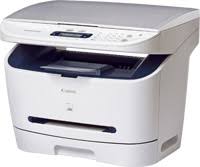
Download Canon i-SENSYS MF3228 Laser Printer Driver for Windows 10/8.1/8/7/Vista 32bit-64bit
MF3220/MF3228 MFDrivers (CARPS / ScanGear)
Printer Canon i-SENSYS MF3228
Canon i-SENSYS MF3228 Printer Driver for Windows
Compatibility Systems: Windows 10 (32bit), 10 (64bit), Windows 8.1 (32bit), 8.1 (64bit), Windows 8 (32bit), 8 (64bit), Windows 7 (32bit), 7 (64bit), Vista (32bit), Vista (64bit)
*Precaution When Using a USB Connection Disconnect the USB cable that connects the device and computer before installing the driver. Connect the USB cable after installing the driver. Driver and application software files have been compressed. The following instructions show you how to download the compressed files and decompress them.
To download files, click the file link, click [Accept & Download], then select [Save] and specify the directory where you want to save the file. Click [Save] to start the file download.
Downloaded files are saved in the specified folder in a self-extracting format (.exe format).
Double-click the files to decompress them. A new folder will be created in the same folder. The new folder will have the same name as the compressed file.
Follow the instructions in [Readme.txt] that is stored in the folder to install the printer drivers.