
Canon imageRUNNER ADVANCE C350i Driver for macOS 14, 13, 12, 11, 10.15, 10.14, 10.13
UFR II/UFRII LT Printer Driver & Utilities-PS Printer Driver & Utilities-Fax Driver & Utilities
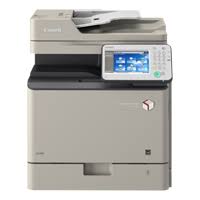
The Canon imageRUNNER ADVANCE C350i color multifunction laser printer is sufficient to meet the needs of medium-sized businesses. This device can perform a variety of office tasks such as printing, copying, scanning and faxing. The Canon imageRUNNER ADVANCE C350i can print 35 pages per minute (black and white or colour). It offers high-quality scanning functionality and the scanning speed is quite good. You can also copy your documents in color or black and white.
Canon imageRUNNER C350i Driver for MAC
Compatible Systems: MacOS Sonoma 14, macOS Ventura 13, macOS Monterey 12, macOS Big Sur 11, macOS Catalina 10.15, macOS Mojave 10.14
| Driver Name | Version | Release date | File Size | Operating Systems | Download Link |
| UFR II/UFRII LT Printer Driver & Utilities | V10.19.20 | 30-Jun-2025 | 103 MB | macOS 10.14 | Download |
| Scanner Driver & Utilities | V2.15.14 | 12.07.23 | 87.5 MB | macOS 14, 13, 12, 11, 10.14 | Download |
The following instructions show you how to download the compressed files and decompress them.
- Click the link. The download will start automatically.
- Files are saved on your computer desktop.
- Double-click the file to mount the Disk Image.
- Double-click the mounted Disk Image.
- Double-click the Installer file in the folder. Installation starts automatically.