
Download Canon imageRUNNER ADVANCE C5500i III Series Printer Driver for Windows 11, 10, 8.1, 7 (32bit-64bit)
- Generic Plus PCL6 Printer Driver and Generic Plus UFR II Printer Driver for Microsoft Windows
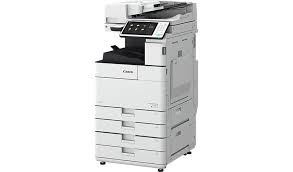
Canon imageRUNNER ADVANCE C5500i Printer Driver for Windows
Compatibility Systems: Windows 11, Windows 10 (32bit), 10 (64bit), Windows 8.1 (32bit), 8.1 (64bit), Windows 8 (32bit), 8 (64bit), Windows 7 (32bit), 7 (64bit)
| Driver Name | Version | Release date | File Size | Operating systems | Download Link |
| Generic Plus PCL6 Printer Driver | V3.00 | 11 September 2024 | 66.1MB | Windows 11-10(32bit)-10 (64bit) | Download |
| Generic FAX Driver | V10.60 | 10 September 2024 | 35317950 KB | Windows 11 – Windows10-10×64 – Windows 8.1-8.1×64 – Windows 7-7×64 | Download |
Generic Plus PCL6 Printer Driver: The Canon-developed Generic Plus PCL6 Printer Driver is a common driver that supports multiple Canon devices.
Generic Plus UFR II Printer Driver: This is a Canon-developed Generic Plus UFR II Printer Driver. This is a generic printer driver that supports various Canon devices. You can use the same driver for all printer models by changing the settings for the printing port and device information.
Setup
- To download files, click the file link, select [Save], and specify the directory where you want to save the file.The download will start automatically.
- Downloaded files are saved in the specified folder in a self-extracting format (.exe format).
- Double-click the files to decompress them. A new folder will be created in the same folder. The new folder will have the same name as the compressed file.
- Double-click the decompressed Setup.exe file to start installation.