
Download Canon imageCLASS LBP228dw Printer Driver for MAC [OS X 10.11.6 – macOS 12.1]
UFR II/UFRII LT Printer Driver & Utilities for Macintosh
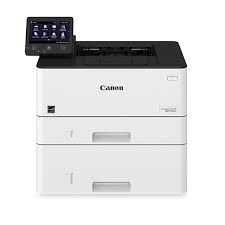
Designed for small work-groups, the imageCLASS LBP228dw printer requires fast performance and minimal maintenance. It has the ability to add an extra paper tray for busy groups. It has a 5″ intuitive, color display that can be used like a smartphone. It can be customized by the device manager. The first-out time is up to 5.3 seconds. The double-sided printing screen also helps to reduce paper consumption.
Canon imageCLASS LBP228dw Driver for MAC
Compatible Systems: MacOS Sonoma 14, macOS Ventura 13, macOS Monterey 12, macOS Big Sur 11, macOS Catalina 10.15, macOS Mojave 10.14
| Driver Name | Version | Release date | File Size | Operating Systems | Download Link |
| UFR II/UFRII LT Printer Driver & Utilities | V10.19.20 | 30-Jun-2025 | 103.4 MB | macOS 10.14 | Download |
| Scanner Driver & Utilities | V2.15.14 | 12.07.23 | 87.6 MB | macOS 14, 13, 12, 11, 10.14 | Download |
UFR II/UFRII LT Printer Driver & Utilities: The following instructions show you how to download the compressed files and decompress them.
1. Click the link. The download will start automatically.
2. Files are saved on your computer desktop.
3. Double-click the file to mount the Disk Image.
4. Double-click the mounted Disk Image.
5. Double-click the Installer file in the folder. Installation starts automatically.
Canon imageCLASS LBP228dw Driver for Windows (64bit)
Ver: V2.60
Post Date: 21 Jan, 2022
Name: GPlus_UFRII_Driver_V260_W64_00.exe
Operating Systems: Windows 11, Windows 10 (64-bit), Windows 8.1 (64-bit), Windows 8 (64-bit), Windows 7 (64-bit)
Download
Size:33.35 MB