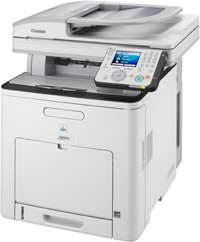
Download Canon i-SENSYS MF9280Cdn Printer Driver for Windows 11-10-8.1-7 (32bit-64bit) and Driver for MAC OS X (13, 12, 11, 10.15, 10.14, 10.13, v10.12) and for Linux (32bit-64bit)
Generic Plus PCL6 Printer Driver for Microsoft Windows PS Printer Driver & Utilities- UFR II/UFRII LT Printer Driver & Utilities for Macintosh UFR II/UFRII LT Printer Driver for Linux
Canon i-SENSYS MF9280Cdn Printer
Canon i-SENSYS MF9280Cdn Printer Driver for Windows
Compatibility Systems: Windows 11, Windows 10 (32bit), Windows 10 (64bit), Windows 8.1 (32bit), Windows 8.1 (64bit), Windows 7 (32bit), Windows 7 (64bit)
Canon i-SENSYS MF9280Cdn Driver Description for Windows
Generic Plus PCL6 Printer Driver: The Canon-developed Generic Plus PCL6 Printer Driver is a common driver that supports multiple Canon devices. It provides an optimal user interface for your device.
Canon i-SENSYS MF9280Cdn Printer Driver for MAC
Operating Systems: macOS Ventura 13, Monterey 12, macOS Big Sur 11, macOS Catalina 10.15, macOS Mojave 10.14, macOS High Sierra 10.13, macOS Sierra v10.12
Windows 10 (32-bit), Windows 10 (64-bit), Windows 8.1 (32-bit), Windows 8.1 (64-bit), Windows 8 (32-bit), Windows 8 (64-bit), Windows 7 (32-bit), Windows 7 (64-bit)