Languages: English, Français, Español, Italiano, Deutsch, Dansk, Suomi, Nederlands, Norsk, Svenska, Русский, لعربية, Čeština, Ελληνικά, Magyar, Polski, Português, Türkçe, Bahasa Indonesia, 日本語 한국어 繁體中文 ไทย
Canon PIXMA G3200 Driver Download for Windows 11-10-8.1-8-7 32bit-64bit
G3000 series Full Driver & Software Package/ G3000 series XPS Printer Driver (Windows)
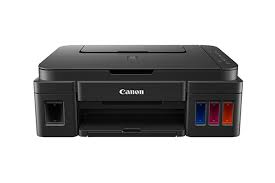
Canon PIXMA G3200 MegaTank Inkjet Printers
The Canon PIXMA G3200 All-in-One Wireless Super Tank Printer, Copier, Scanner and Mobile Press. Google cloud Print makes it easy to Print from your Android Phone and tablet.
Canon G3200 Driver Download for Windows
Compatibility Systems: Windows 11, Windows 10 (32bit), 10 (64bit), Windows 8.1 (32bit), 8.1 (64bit), Windows 8 (32bit), 8 (64bit), Windows 7 (32bit), 7 (64bit), Vista (32bit), Vista (64bit),XP, WinXP (64bit)
G3000 series Full Driver & Software Package: This file will download and install the drivers, application or manual you need to set up the full functionality of your product.
Download / Installation Procedures
IMPORTANT: Be sure to connect your PC to the Internet while performing the following:
1. Download the file. For the location where the file is saved, check the computer settings. 2. Double-click the downloaded .exe file. It will be decompressed and the Setup screen will be displayed. Follow the instructions to install the software and perform the necessary settings.
G3000 series XPS Printer Driver: This is an optional printer driver allowing 16-bits per colour (bpc) printing.
Download / Installation Procedures
1. Download the file. For the location where the file is saved, check the computer settings. 2. Double-click the downloaded EXE file to decompress it, then installation will start automatically.