Download Canon PIXMA TS5351a Wireless Colour All in One Inkjet Photo Printer Driver for 11-10-8.1-7 (32bit/64bit) and Driver for Linux (32bit-64bit)
TS5300 series Driver setup package & TS5300 series MP Drivers (Windows) IJ Printer Driver for Linux (debian Packagearchive) & IJ Printer Driver for Linux (rpm Packagearchive)
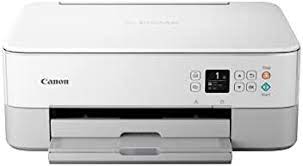
Canon PIXMA TS5351a Printer
The All-in-One printer features a contemporary two-tone design with LED status bar, making it an ideal choice for modern creators. Start designing with Easy-PhotoPrint Editor or try paper crafts from Creative Park. Take control with your smartphone with fast wireless connectivity and print, scan and connect to your social media accounts via the Canon PRINT app; With Wireless Connection, all you have to do is tap a button to connect.
Canon PIXMA TS5351a Printer Driver for Windows
Compatible Systems: Windows 11, Windows 10 (32bit), 10 (64bit), Windows 8.1 (32bit), Windows 8.1 (64bit),Windows 7 (32bit), 7 (64bit)
Canon PIXMA TS5351a Series Printer Driver Description for Windows
This file will download and install the driver needed to set up and utilize your product. Once complete, you will be able to install software to enhance the product’s functionality.
Download
Download the file. For the location where the file is saved, check the computer settings.
Double-click the downloaded .exe file. It will be decompressed and the Setup screen will be displayed. Follow the instructions to install the software and perform the necessary settings.
Canon PIXMA TS5351a Printer Driver for Linux
Operating Systems: Linux 64bit – Linux 32bit
Driver Name
Version
Release date
File Size
Operating systems
Download Link
IJ Printer Driver for Linux (debian Packagearchive)
IJ Printer Driver for Linux (debian Packagearchive): This software is a printer driver for printing using the Canon IJ printer. IJ Printer Driver for Linux (rpm Packagearchive): This software is a printer driver for printing using the Canon IJ printer.
Canon PIXUS MG7730 Printer Driver for Windows 11,10,8.1,8,7, Vista, XP 32bit-64bit and Driver for macOS (10.15, 10.14, 10.13, v10.12.1, v10.11, v10.10, v10.9, OS X v10.8, v10.7) and Driver for Linux (32bit-64bit)
MG7700 series Full Driver & Software Package- MG7700 series MP Drivers- MG7700 series XPS Printer Driver for Microsoft Windows MG7700 series CUPS Printer Driver- ICA Driver for MAC IJ Printer Driver- IJ Printer Driver for Linux (debian Packagearchive)
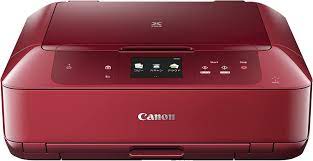
Canon Pixma Printer MG7730
Supports 6-colour hybrid-CD/DVD label printing for crisp and clear text. Compatible with large capacity ink tanks. It is Wi-Fi compatible and has an auto-on feature. Easy to use 3.5 inch LCD monitor with touch panel and smart touch system (light navigation). It can also do automatic double-sided printing.
Canon PIXMA MG7730 Printer Driver for Windows
Compatibility Systems: Windows 11, Windows 10 (32bit), 10 (64bit), Windows 8.1 (32bit), 8.1 (64bit), Windows 8 (32bit), 8 (64bit), Windows 7 (32bit), 7 (64bit), Vista (32bit), Vista (64bit),XP, WinXP (64bit)
Driver Name
Version
Release date
File Size
Operating systems
Download Link
MG7700 series Full Driver & Software Package
1.0
19 Aug, 2015
48.03 MB
Windows 10/10 x64/8.1/8.1 x64/8/8 x64/7/7 x64/Vista/Vista64/XP
MG7700 series Full Driver & Software Package: This is an online installation software to help you to perform initial setup of your product on a PC (either USB connection or network connection) and to install various software.
Setup
Download the file. For the location where the file is saved, check the computer settings.
Double-click the downloaded .exe file. It will be decompressed and the Setup screen will be displayed. Follow the instructions to install the software and perform the necessary settings.
MG7700 series MP Drivers: This is a driver that will provide full functionality for your selected model. It also allows you to set-up your printer for printing and scanning wirelessly. For an enhanced user experience we also recommend installing My Image Garden software. A version of this standard driver will have been included on the CD provided with your original product.
MG7700 series XPS Printer Driver: This is an advanced printer driver. XPS printer drivers supports 16-bits per color (bpc) printing, which enables more smooth gradation printing than the current drivers (8-bpc printing).
Download / Installation Procedures
Download the file. For the location where the file is saved, check the computer settings.
Double-click the downloaded EXE file to decompress it, then installation will start automatically.
Canon PIXMA MG7730 Printer Driver for MAC
Operating Systems: MacOS Catalina 10.15, macOS Mojave 10.14, macOS High Sierra 10.13, macOS Sierra v10.12.1 or later, OS X El Capitan v10.11, OS X Yosemite v10.10, OS X Mavericks v10.9, OS X Mountain Lion v10.8, OS X Lion v10.7
Driver Name
Version
Release date
File Size
Operating systems
Download Link
MG7700 series CUPS Printer Driver
16.40.1.0a
29 Sep, 2022
16.025 MB
macOS 10.15, 10.14, 10.13, v10.12.1, v10.11, v10.10, v10.9, OS X v10.8, v10.7
MG7700 series CUPS Printer Driver: This is a printer driver for your selected model. For an enhanced user experience we also recommend installing My Image Garden software. ICA Driver: This is a scanner driver for your selected model.
IJ Printer Driver for Linux (Source file): This software is a source file for the Linux printer drivers. IJ Printer Driver for Linux (debian Packagearchive): This software is a printer driver for printing using the Canon IJ printer.
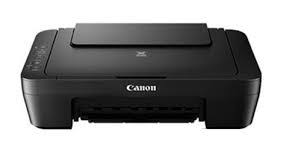
TS3100 series Full Driver & Software Package: This file will download and install the drivers, application or manual you need to set up the full functionality of your product.
Setup
Download the file. For the location where the file is saved, check the computer settings.
Double-click the downloaded .exe file. It will be decompressed and the Setup screen will be displayed. Follow the instructions to install the software and perform the necessary settings.
TS3100 series MP Drivers: This driver will provide full printing and scanning functionality for your product.
Installation
Download the file. For the location where the file is saved, check the computer settings.
Double-click the downloaded EXE file to decompress it, then installation will start automatically.