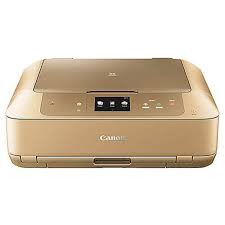
Canon PIXMA MG7760 Driver Download for Windows 11-10-8.1-8-7 (32bit-64bit)
MG7700 series MP Drivers, MG7700 series XPS Printer Driver for Microsoft Windows
Canon PIXMA MG7760 Printer
Canon PIXMA MG7760 Driver Download for Windows
Compatibility Systems: Windows 11, Windows 10 (32bit), 10 (64bit), Windows 8.1 (32bit), 8.1 (64bit), Windows 8 (32bit), 8 (64bit), Windows 7 (32bit), 7 (64bit)
This is a driver that will provide full functionality for your selected model. It also allows you to set-up your printer for printing and scanning wirelessly. For an enhanced user experience we also recommend installing My Image Garden software. A version of this standard driver will have been included on the CD provided with your original product.
Download / Installation Procedures 1. Download the file. For the location where the file is saved, check the computer settings. 2. Double-click the downloaded EXE file to decompress it, then installation will start automatically.
Uninstall Procedures If needed, you can uninstall this program using the Control Panel. **The steps below are for Windows 7. This procedure may be different for other OSes. 1. On the Start menu, click Control Panel, and then, under Programs click Uninstall a Program 2. A page will open with a list of installed programs. Double click on the program that you want to uninstall. 3. Click “Yes” then “OK”, this will complete the uninstallation process.
Canon PIXMA G3625 Driver for MAC (14, 13, 12, 11, 10.15, 10.14, 10.13, v10.12, v10.11, v10.10)
G3000 series Full Driver & Software Package (Mac)
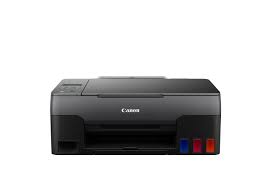
Canon Printer PIXMA G3625 MegaTank Printer
Canon PIXMA G3625 Printer Driver for MAC
Operating Systems: macOS Sequoia 15, macOS Sonoma 14, macOS Ventura 13, Monterey 12, macOS Big Sur 11, macOS Catalina 10.15, macOS Mojave 10.14, macOS High Sierra 10.13, macOS Sierra v10.12.1 or later, OS X El Capitan v10.11, OS X Yosemite v10.10.5
This file will download and install the drivers, application or manual you need to set up the full functionality of your product.
Download / Installation Procedures
Download the file. For the location where the file is saved, check the computer settings.
Double-click the downloaded file and mount it on the Disk Image.
Double-click the mounted Disk Image.
Double-click the “Setup” file to launch the setup screen. By following the instructions on the screen, install the software and do the connection settings for your product.