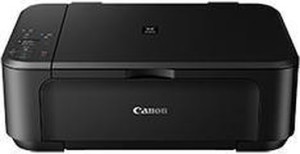
The PIXMA MG3522 wireless inkjet photo all-in-one features excellent print quality and exceptional ease of use. The hybrid ink system is ideal for vibrant colors and sharp text. Print borderless photos with a maximum color print resolution of 4800 x 1200 dpi using FINE printhead technology.
Canon PIXMA MG3522 Drivers Download for Windows
Compatibility Systems: Windows 11, Windows 10 (32bit), 10 (64bit), Windows 8.1 (32bit), 8.1 (64bit), Windows 8 (32bit), 8 (64bit), Windows 7 (32bit), 7 (64bit), Vista (32bit), Vista (64bit),XP, WinXP (64bit)
Name: win-mg3500-1_1-ucd.exe Ver: 1.1 Size: 48.3MB Compatible Systems: Windows 10 (32bit), 10 (64bit), 8.1(32bit), 8.1(64bit), 8(32bit), 8(64bit), 7(32bit), 7(64bit), Vista (32bit), Vista (64bit), WinXP Download Relase Date: July 22, 2015
Canon Pixma MG8250 Driver for Mac
Version: 16.20.0.0 Release date: Oct 17, 2017 File name: mcpd-mac-mg8200-16_10_0_0-ea21_3.dmg Compatibility Systems: MacOS 10.13 (High Sierra), macOS 10.12 (Sierra), OS X 10.11 (El Capitan), OS X 10.10 (Yosemite), OS X 10.9 (Mavericks), OS X 10.8 (Mountain Lion), Mac OS X 10.7 (Lion) Download Size: 13.5 MB
Canon Pixma MG3500 Driver Download for Windows 7-8-8.1-10-11 (64bit/32bit)
Print Driver and Scan Utility Installer-MG3500 series XPS Printer Driver for Microsoft Windows
Canon Pixma MG3500 Printer
Canon PIXMA MG3500 Driver Download for Windows
Compatibility Systems: Windows 11, Windows 10 (32bit), 10 (64bit), Windows 8.1 (32bit), 8.1 (64bit), Windows 8 (32bit), 8 (64bit), Windows 7 (32bit), 7 (64bit), Vista (32bit), Vista (64bit),XP, Windows XP (64bit)
Print Driver and Scan Utility Installer: This is a driver that will provide full functionality for your selected model. It also allows you to set-up your printer for printing and scanning wirelessly. For an enhanced user experience we also recommend installing My Image Garden software. A version of this standard driver will have been included on the CD
Canon Pixma MG8250 Driver Mac
Version: 16.20.0.0 Released: 17 October 2017 File name: mcpd-mac-mg8200-16_10_0_0-ea21_3.dmg Operating Systems: MacOS 10.13 (High Sierra), macOS 10.12 (Sierra), OS X 10.11 (El Capitan), OS X 10.10 (Yosemite), OS X 10.9 (Mavericks), OS X 10.8 (Mountain Lion), Mac OS X 10.7 (Lion) Download Size: 13.1 MB