Canon PIXMA iP110 Printer Driver Download for Linux (32bit-64bit)
IJ Printer Driver for Linux (Source file)-IJ Printer Driver for Linux (rpm Packagearchive)-IJ Printer Driver for Linux (debian Packagearchive)
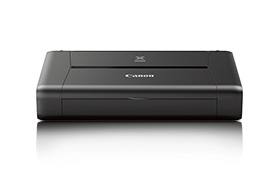
Canon PIXMA iP110 Printer
The Canon PIXMA iP110 is quite lightweight for a printer. This makes it very portable. It can even fit in your laptop bag, so you can take it anywhere. It’s also easy to connect to the printer wirelessly and print on the go.
It lets you print directly from smart devices and the cloud with great results. All you need to do is download the Canon PRINT app for your smartphone or tablet. Using this app, you can access cloud services directly. You can check the printer status, manual or real-time ink levels over Wi-Fi or the internet. Apple AirPrint and Google Cloud Print support are also available to complement your mobile connectivity options.
You can print your photos or favorite movie scenes with 9600 dpi prints.
Download Canon PIXMA iP4880 Printer Driver for Windows 10-8.1-8-7-Vista 32bi-64bit
iP4800 series Printer Driver and iP4800 series XPS Printer Driver for Microsoft Windows
Canon PIXMA iP4800
Canon PIXMA iP4800 Driver for Windows
Compatibility Systems: Windows 10 (32bit), 10 (64bit), Windows 8.1 (32bit), 8.1 (64bit), Windows 8 (32bit), 8 (64bit), Windows 7 (32bit), 7 (64bit), Vista (32bit), Vista (64bit),XP, WinXP (64bit)
This file is a printer driver for Canon IJ printers.
Download / Installation Procedures
Click the link, select [ Save ], specify “Save As”, then click [ Save ] to download the file. Memo : If you select [ Run ] ( or [ Open ] ) instead of [ Save ], the file will be automatically installed after it is saved.
The downloaded file will be saved in the specified place in the self-extracting form (.exe format).
Double-click the downloaded EXE file to decompress it, then installation will start automatically.
Uninstall Procedures If needed, you can uninstall this program using the Control Panel.
*The steps below are for Windows 7. This procedure may be different for other OSes.
On the Start menu, click Control Panel, and then, under Programs click Uninstall a Program.
A page will open with a list of installed programs. Double click on the program that you want to uninstall.
Click “Yes” then “OK”, this will complete the uninstallation process.
iP4800 series XPS Printer Driver
This file is a printer driver for Canon IJ printers. XPS printer drivers support 16-bpc printing, which enables more smooth gradation printing than the current drivers (8-bpc printing).
Download / Installation Procedures
Click the link, select [ Save ], specify “Save As”, then click [ Save ] to download the file. Memo: If you select [ Run ] ( or [ Open ] ) instead of [ Save ], the file will be automatically installed after it is saved.
The downloaded file will be saved in the specified place in the self-extracting form (.exe format).
Double-click the downloaded EXE file to decompress it, then installation will start automatically.