Canon PIXMA G2012 Driver MAC

Canon Pixma G2012 Driver for Mac OS 14, 13, 10.15, 10.14, 10.13, v10.12.1, v10.11, 10.10, v10.9, v10.8.5, v10.7.5

G2000 series CUPS Printer Driver and ICA Driver for MACINTOSH

Canon PIXMA G2012 Driver MAC
Canon Pixma G2012 All-in-One Ink Tank Colour Printers

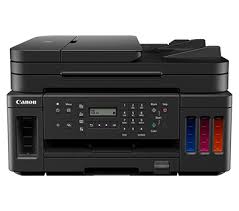
Canon PIXMA G2012 is a megatank inkjet printer. The printer is ideal for home and small offices. It produces both economical and high-quality prints. In addition to printing, it can also copy and scan. Pixma G2012 , MegaTank system has a high amount of ink capacity. This way you can print longer and replace ink cartridges less frequently.

Canon PIXMA G2012 Driver for MAC

Operating Systems: macOS Sonoma 14, macOS Ventura 13, macOS Catalina 10.15, macOS Mojave 10.14, macOS High Sierra 10.13, macOS Sierra v10.12.1 or later, OS X El Capitan v10.11, OS X Yosemite v10.10, OS X Mavericks v10.9, OS X Mountain Lion v10.8.5, OS X Lion v10.7.5

Driver NameVersionRelease dateFile SizeOperating systemsDownload Link
G2000 series CUPS Printer Driver16.40.1.0a29 Sep, 202214.67 MBmacOS 10.15, 10.14, 10.13, v10.12.1, OS X v10.11, OS X v10.10, OS X v10.9, OS X v10.8, OS X v10.7Download
ICA Driver5.0.026 Sep, 20233 MBmacOS 14
macOS 13
Download
Canon Pixma G2012 Driver Description for MAC

G2000 series CUPS Printer Driver: This driver will provide full printing functionality for your product.

Procedures for the download and installation

  1. Download the file. For the location where the file is saved, check the computer settings.
  2. Double-click the downloaded file and mount it on the Disk Image.
  3. Double-click the mounted Disk Image.
  4. Double-click the packaged file in the folder. Installation starts automatically.

Canon i-SENSYS MF265dw Driver

Canon i-SENSYS MF265dw Driver Download for Windows 11-10 (32bit-64bit)

Generic Plus PCL6 Printer Driver, Generic PCL6 V4 Printer Driver for Microsoft Windows

Canon i-SENSYS MF265dw Laser MF Printer

Canon i-SENSYS MF265dw Driver Download for Windows

Compatible Systems: Windows 11, Windows 10 (32bit), 10 (64bit)

Driver NameVersionRelease dateFile SizeDownload Link
Generic Plus PCL6 Printer DriverV2.901 Aug, 202364.06 MBDownload
Generic PCL6 V4 Printer DriverV2.128 Nov, 202237.1 MBDownload
Canon i-SENSYS MF265dw Driver Description for Windows

Generic Plus PCL6 Printer Driver: The Canon-developed Generic Plus PCL6 Printer Driver is a common driver that supports multiple Canon devices. It provides an optimal user interface for your device.

*Precaution When Using a USB Connection
Disconnect the USB cable that connects the device and computer before installing the driver. Connect the USB cable after installing the driver. Driver and application software files have been compressed. The following instructions show you how to download the compressed files and decompress them.

  1. To download files, click the file link, select [Save], and specify the directory where you want to save the file. The download will start automatically.
  2. Downloaded files are saved in the specified folder in a self-extracting format (.exe format).
  3. Double-click the files to decompress them. A new folder will be created in the same folder. The new folder will have the same name as the compressed file.
  4. Double-click the decompressed Setup.exe file to start installation.

Canon imageRUNNER ADVANCE C350i Driver

Canon imageRUNNER ADVANCE C350i Driver Download for Windows 11-10 (32bit-64bit)

Generic Plus PCL6 Printer Driver and Generic FAX Driver for Microsoft Windows

Canon imageRUNNER ADVANCE C350i MFP

The Canon imageRUNNER ADVANCE C350i is a color multifunction laser printer developed for use in the workplace. This device helps you by performing various office tasks such as printing, copying, scanning and faxing with ease.

Canon imageRUNNER ADVANCE C350i Driver for Windows

Operating Systems: Windows 11, Windows 10 (32bit), Windows10 (64bit)

Driver NameVersionRelease dateFile SizeDownload Link
Generic Plus PCL6 Printer DriverV2.901 Aug, 202363.99 MBDownload
Generic FAX DriverV10.572 August 202330.0 MBDownload
Canon imageRUNNER ADVANCE C350i Driver Description for Windows

SETUP

Driver and application software files have been compressed.
The following instructions show you how to download the compressed files and decompress them.

  1. To download files, click the file link, select [Save], and specify the directory where you want to save the file. The download will start automatically.
  2. Downloaded files are saved in the specified folder in a self-extracting format (.exe format).
  3. Double-click the files to decompress them. A new folder will be created in the same folder. The new folder will have the same name as the compressed file.
  4. Double-click the decompressed Setup.exe file to start installation.
Exit mobile version