Canon imageCLASS D1150 Printer Driver Download for 14.4.1, 13, 12, 11, 10.15, 10.14, 10.13.6
MF Printer Driver & Utilities for Mac
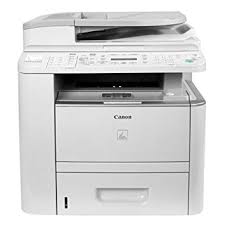
You can easily carry out your Printing, Photocopying, Faxing and Scanning tasks with the Canon imageCLASS D1150 Black and White Laser Multi-Functional Copier. This device is easy to use and integrates easily into your workflow.
Nowadays, it is necessary to keep your costs low in the office environment. The 50-sheet Duplex Automatic Document Feeder (DADF) lets you copy and scan in color from one- or two-sided originals. It significantly reduces your paper usage by allowing you to easily print two-sided printouts. Most importantly, Smart Energy Saving Mode reduces your power consumption to approximately three watts of energy, and the product meets Energy Star guidelines, helping you save on energy costs.
This device offers convenient, multifunctional features that combine all your office machines into one durable, fast and energy-efficient networked copier.
Canon imageCLASS D1150 Printer Driver for MAC
Version: V10.11.11
File Name: mac-mf-v101111-00.dmg
Released: 04.05.24
Size: 36.65 MB
Operating Systems: MacOS Sonoma 14.4.1, macOS Ventura 13, macOS Monterey 12, macOS Big Sur 11, macOS Catalina 10.15, macOS Mojave 10.14, macOS High Sierra 10.13.6
SETUP
The following instructions show you how to download the compressed files and decompress them.
1. Click the link. The download will start automatically.
2. Files are saved on your computer desktop.
3. Double-click the file to mount the Disk Image.
4. Double-click the mounted Disk Image.
5. Double-click the Installer file in the folder. Installation starts automatically.
Canon imageCLASS D1150 Driver Download for Windows (64bit)
Version: 2.70
File Name: D1100 Series Driver V 2.70 for W64
Release Date: 06.07.18
Size: 28.6 MB
Compatibility Systems: Windows 11, Windows 10 (64bit), Windows 8.1 (64bit), Windows 7(64bit)