Download Canon Pixma TS6340 Multifunctional Inkjet Printer Driver for Windows 11/10/8.1/7 32bit-64bit
TS6300 series MP Drivers & TS6300 series Driver setup package (Windows)
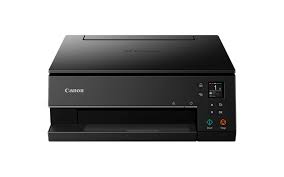
While seamless wireless connectivity enables straightforward control via smart devices. With 5 individual inks, including a dedicated pigment black ink, FINE technology and 100 years of album life, the TS6340 has all the equipment to perfect photos and crisp document text.
Canon Pixma TS6340 Driver for Windows
Compatibility Systems: Windows 11, Windows 10 (32bit), 10 (64bit), Windows 8.1 (32bit), 8.1 (64bit), Windows 7 (32bit), 7 (64bit)
| Driver Name | Version | Release date | File Size | Operating systems | Download Link |
| TS6300 series Driver setup package | 1.3 | 26 Jul, 2022 | 21 MB | Windows 11-10-10×64- 8.1-8.1×64-7-7×64 | Download |
| TS6300 series MP Drivers | 1.04 | 26-Feb-2026 | 99.16 MB | Windows 11-10-10×64- 8.1-8.1×64-7-7×64 | Download |
TS6300 series Driver setup package: This file will download and install the driver needed to set up and utilize your product. Once complete, you will be able to install software to enhance the product’s functionality.
Download / Installation Procedures
*Be sure to connect your PC to the Internet while performing the following:
- Download the file. For the location where the file is saved, check the computer settings.
- Double-click the downloaded .exe file. It will be decompressed and the Setup screen will be displayed. Follow the instructions to install the software and perform the necessary settings.
TS6300 series MP Drivers: This driver will provide full printing and scanning functionality for your product.
Download / Installation Procedures
- Download the file. For the location where the file is saved, check the computer settings.
- Double-click the downloaded EXE file to decompress it, then installation will start automatically.