Download Canon PIXMA TS8010 Photo All-in-One Inkjet Printers Driver for Windows 11-10-8.1-8-7-Vista (32bit-64bit) and Driver for MAC (10.15, 10.14, 10.13, v10.12, v10.11, v10.10, v10.9, v10.8) and Driver for Linux (32bit-64bit)
TS8000 series MP Drivers- TS8000 series XPS Printer Driver and TS8000 series Full Driver & Software Package for Microsoft Windows
TS8000 series CUPS Printer Driver and ICA Driver for MAC
IJ Printer Driver for Linux (Source file)
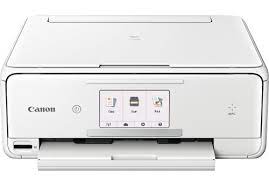
An exceptionally productive everyday printer, you’ll be pleased with the PIXMA TS8010 as it’s easy to connect from virtually anywhere in your home. Print beautiful photos, documents, color labels and envelopes from any device you want via Wi-Fi, AirPrint, Google Cloud Print, NFC, USB, built-in SD Card reader and even the Cloud. And like most Canon printers, it’s iPhone/iPad compatible, making it an ideal smartphone photo printer. The 4.3″ touchscreen and intuitive user interface, document extraction reminder and automatic expandable output tray make it super easy to use.
Canon PIXMA TS8010 Printer Driver for Windows
| Driver Name | Version | Release date | File Size | Operating systems | Download Link |
| TS8000 series MP Drivers | 1.02 | 15 Oct, 2021 | 69 MB | Windows 11- 10 32bit-10 64bit – 8.1-8.1×64-8-8×64- 7-7×64 – Vista- Vistax64 | Download |
| TS8000 series Full Driver and Software Package | 1.0 | 30 September 2016 | 16 MB | Windows 11 – Windows10-10×64 – Windows 8.1-8.1×64 – Windows 8-8×64 – Windows 7-7×64 – Vista- Vistax64 | Download |
TS8000 series MP Drivers: This driver will provide full printing and scanning functionality for your product.
TS8000 series Full Driver & Software Package: This file will download and install the drivers, application or manual you need to set up the full functionality of your product.
Setup
Note: Be sure to connect your PC to the Internet while performing the following:
- Download the file. For the location where the file is saved, check the computer settings.
- Double-click the downloaded .exe file. It will be decompressed and the Setup screen will be displayed. Follow the instructions to install the software and perform the necessary settings.
Canon PIXMA TS8010 Printer Driver for MAC
Operating Systems: MacOS Catalina 10.15, macOS Mojave 10.14, macOS High Sierra 10.13, macOS Sierra v10.12.1 or later, OS X El Capitan v10.11, OS X Yosemite v10.10, OS X Mavericks v10.9, OS X Mountain Lion v10.8
| Driver Name | Version | Release date | File Size | Operating systems | Download Link |
| TS8000 series CUPS Printer Driver | 24.30.0.0 | 23 January 2023 | 17 MB | macOS 10.15, 10.14, 10.13, v10.12.1, OS X v10.11, OS X v10.10, OS X v10.9, OS X v10.8 | Download |
| ICA Driver | 4.3.4b | 29 July 2022 | 2 MB | macOS X 10.15, 10.14, 10.13, v10.12, v10.11, v10.10, v10.9, v10.8 | Download |
TS8000 series CUPS Printer Driver: This driver will provide full printing functionality for your product.
Download and installation
- Download the file. For the location where the file is saved, check the computer settings.
- Double-click the downloaded file and mount it on the Disk Image.
- Double-click the mounted Disk Image.
- Double-click the packaged file in the folder. Installation starts automatically.
ICA Driver: This driver will provide full scanning functionality for your product.
Canon PIXMA TS8010 Printer Driver for Linux
Operating Systems: Linux 64bit – Linux 32bit
| Driver Name | Version | Release date | File Size | Operating systems | Download Link |
| IJ Printer Driver | 5.40 | 27 January, 2017 | 798 KB | Linux 64bit – Linux 32bit | Download |
| TS9120 Driver | 5.50 | Nov 21, 2017 | 1.09 MB | Fedora 25 (32bit/64bit), Ubuntu 17.04 (32bit/64bit) | Download |
IJ Printer Driver for Linux (Source file): This software is a source file for the Linux printer drivers.