Driver Canon imageRUNNER ADVANCE C9270 PRO Microsoft Windows 11/10/Server 64Bit
Generic Plus PS3 Printer Driver V2.90
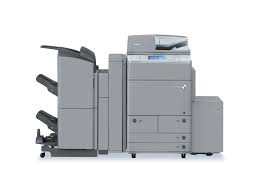
The Canon imageRUNNER ADVANCE C9200 PRO Series delivers high-quality color output with features that help you simplify every step of the production process to maximize productivity and improve profitability.
Canon imageRUNNER ADVANCE C9270 PRO Driver
Outline : This is a Canon-developed Generic Plus PS3 Printer Driver.
This is a generic printer driver that supports various Canon devices. You can use the same driver for all printer models by changing the settings for the printing port and device information.
Caution
An update installation cannot be performed from the Generic PS3 Printer Driver.
This is a package-aware driver.
The following limitations exist when using a shared printer in a point-and-print environment.
* The Generic Plus driver does not support the Add-in products that are included with the following products (applicable products may vary depending on the driver or region).
– Access Management System (AMS Printer Driver Add-in)
– Encrypted Secured Print Driver Add-in
Please use the AMS Printer Driver Add-in and the Encrypted Secured Print Driver Add-in included as standard with the Generic Plus driver.
The Add-in tab will be hidden if a language that is not supported by the Add-in is selected.
– The AMS Printer Driver Add-in includes support for the following languages.
English/French/Italian/German/Spanish
– The Encrypted Secured Printer Driver Add-in includes support for the following languages.
English/French/Italian/German/Spanish
- File name : GPlus_PS3_Driver_V290_W64_00.exe
- File version : V2.90
- File size : 32910KB
Operating Systems: Windows 11, Windows 10 (x64), Windows Server 2022
Size : 33.4 MB
Canon C9280 Driver for Windows
Version: V1.51
File name: GPlus_PCL6_Driver_V151_32_64_00.exe
Released: 1 February 2019
Compatible Systems: Windows 10/10×64/8.1×64/8.1/7/7×64
Download
Size: 57.89 MB