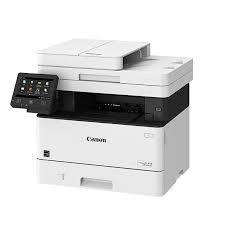
Canon ImageCLASS MF275dw Driver

Canon ImageCLASS MF275dw Driver for Windows 11-10-8.1-7 (32bit-64bit)

MF275dw/ MF273dw/ MF272dw MFDrivers (Generic Plus UFR II / Generic FAX / ScanGear)-Generic FAX Driver-Generic Plus UFR II Printer Driver for Windows

Canon ImageCLASS MF275dw Driver
Canon ImageCLASS MF275dw Printer

It can print up to 30 pages per minute with your first print out in approximately 5.3 seconds (letter). The Canon ImageCLASS MF275dw provides easy connection to mobile devices without the need for a computer, thanks to its WiFi direct connection. Canon PRINT Business, Apple AirPrint, Mopria Print Service. It consumes about 1.0 watt in sleep mode.

Canon ImageCLASS MF275dw Driver for Windows

Compatibility Systems: Windows 11, Windows 10 (32bit), 10 (64bit), Windows 8.1 (32bit), 8.1 (64bit),Windows 7 (32bit), 7 (64bit)

Driver NameVersionRelease dateFile SizeOperating systemsDownload Link
MF275dw/ MF273dw/ MF272dw MFDrivers (Generic Plus UFR II / Generic FAX / ScanGear)V7.7504.27.23155.09 MBWindows 11-10-10×64- 8.1-8.1×64-7-7×64Download
Generic FAX DriverV10.6010 Sep, 202432.2 MBWindows 11- Windows 10 (64bit)Download
Generic Plus UFR II Printer DriverV3.1025 September 202469.99 MBWindows 11-10×64Download
Canon ImageCLASS MF275dw Driver Description for Windows

Generic Plus UFR II Printer Driver – V2.73, Generic FAX Driver – V10.50 (MF275dw), ScanGear – V11.3

Precaution When Using a USB Connection

Disconnect the USB cable that connects the device and computer before installing the driver.

Connect the USB cable after installing the driver.
Drivers and applications are compressed.
Download the file.

*Note: When clicking [Run] on the file download screen (file is not saved to disk)

1. If the User Account Control prompt is displayed, click [Yes], and then click [Run] on the subsequent Security Alert screen.
2. The Setup Wizard will start.
3. After the Setup Wizard has started, follow the instructions on the screen to perform installation.

Generic Plus UFR II Printer Driver

This is a Canon-developed Generic Plus UFR II Printer Driver. This is a generic printer driver that supports various Canon devices. You can use the same driver for all printer models by changing the settings for the printing port and device information.

Precaution When Using a USB Connection

Disconnect the USB cable that connects the device and computer before installing the driver.
Connect the USB cable after installing the driver.
Driver and application software files have been compressed.

The following instructions show you how to download the compressed files and decompress them.

1. To download files, click the file link, select [Save], and specify the directory where you want to save the file. The download will start automatically.
2. Downloaded files are saved in the specified folder in a self-extracting format (.exe format).
3. Double-click the files to decompress them. A new folder will be created in the same folder. The new folder will have the same name as the compressed file.
4. Double-click the decompressed Setup.exe file to start installation.
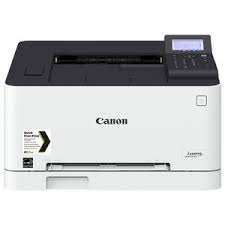
Canon imageCLASS LBP674Cdw Driver Download

Canon imageCLASS LBP674Cdw Driver Download for Windows 11-10-8.1-7 (64bit)

Generic Plus UFR II Printer Driver for Microsoft Windows

Canon imageCLASS LBP674Cdw Printer

High-capacity toner options meet your printing needs and you don’t have to change toner as often. The Canon imageCLASS LBP674Cdw can print double-sided (black / colour, letter) at up to 35 ppm with a fast first print of around 7 seconds. Direct Connect via WiFi provides easy connection to mobile devices without a router. Canon PRINT Business enables writing on the go with Apple AirPrint, Mopria Print Service. Also sleep mode uses less than 1 watt.

Canon imageCLASS LBP674Cdw Driver for Windows

Compatibility Systems: Windows 11, Windows 10 (64bit), Windows 8.1 (64bit), Windows 7 (64bit)

Driver NameVersionRelease dateFile SizeOperating systemsDownload Link
Generic Plus UFR II Printer DriverV3.1009-25-2470.1 MBWindows 11 – Windows10x64Download
Generic Plus UFR II Printer DriverV2.7330 May, 202333.7 MBWindows 8.1×64-Windows 7×64Download
Canon imageCLASS LBP674Cdw Driver Description for Windows

Generic Plus UFR II Printer Driver:

This is a Canon-developed Generic Plus UFR II Printer Driver. This is a generic printer driver that supports various Canon devices. You can use the same driver for all printer models by changing the settings for the printing port and device information.

Important

Precaution When Using a USB Connection
Disconnect the USB cable that connects the device and computer before installing the driver.
Connect the USB cable after installing the driver.

Setup
Driver and application software files have been compressed.

The following instructions show you how to download the compressed files and decompress them.

1. To download files, click the file link, select [Save], and specify the directory where you want to save the file. The download will start automatically.
2. Downloaded files are saved in the specified folder in a self-extracting format (.exe format).
3. Double-click the files to decompress them. A new folder will be created in the same folder. The new folder will have the same name as the compressed file.
4. Double-click the decompressed Setup.exe file to start installation.
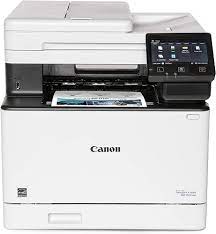
Canon imageCLASS MF652Cdw Driver MAC

Download Canon imageCLASS MF652Cdw Printers Driver for MAC 13-12-11-10.15-10.14-10.13-10.12-10.11-10.10-10.9-10.8-10.7-10.6

UFR II/UFRII LT Printer Driver & Utilities for Mac [macOS 10.12.6 – macOS 13.2.1]

Canon imageCLASS MF652Cdw Printer

Canon imageCLASS MF652Cdw Printer Driver for MAC

Compatible Systems: macOS Ventura 13, Monterey 12, macOS Big Sur 11, macOS Catalina 10.15, macOS Mojave 10.14, macOS High Sierra 10.13, macOS Sierra v10.12.1 or later, OS X El Capitan v10.11, OS X Yosemite v10.10, OS X Mavericks v10.9, OS X Mountain Lion v10.8.5, OS X Lion v10.7.5

Driver NameVersionRelease dateFile SizeOperating systemsDownload Link
UFR II/UFRII LT Printer Driver & UtilitiesV10.19.1303.10.23100.8 MBMAC OS 13-12-11- 10.15-10.14-10.13-
10.12-10.11-10.10- 10.9-10.8-10.7-10.6
Download
Canon imageCLASS MF652Cdw Driver Description for MAC

Setup

The following instructions show you how to download the compressed files and decompress them.

1. Click the link. The download will start automatically.
2. Files are saved on your computer desktop.
3. Double-click the file to mount the Disk Image.
4. Double-click the mounted Disk Image.
5. Double-click the Installer file in the folder. Installation starts automatically.

Exit mobile version