Canon ImageCLASS MF751Cdw Driver Download for Windows 11-10-8.1-7 (32bit/64bit)
MF753Cdw/ MF751Cdw MFDrivers (Generic Plus UFR II / Generic FAX / ScanGear)-Generic Plus UFR II Printer Driver
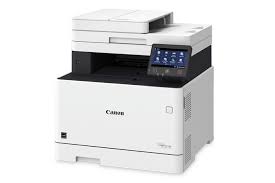
Canon Color imageCLASS MF751Cdw MFP
The Canon Color imageCLASS MF751Cdw is a multifunctional color laser printer designed for small and medium businesses and workgroups. The MF751Cdw can print quickly in color and black and white. It offers high quality color printing with a maximum resolution of up to 1200 x 1200 dpi. It has a built-in flatbed scanner with automatic document feeder (ADF) for scanning and copying documents. The scanner supports color scanning and has several scanning options. You can use the MF751Cdw as a standalone copier. It supports various copy features such as multiple copy, reduce/enlarge and more.
Canon ImageCLASS MF751Cdw Driver for Windows
Driver Name
Version
Release date
File Size
Operating systems
Download Link
MF753Cdw/ MF751Cdw MFDrivers (Generic Plus UFR II / Generic FAX / ScanGear)
V7.50
01.31.23
269 MB
Windows 11 – Windows10-10×64 – Windows 8.1-8.1×64 – Windows 7-7×64
Canon ImageCLASS MF751Cdw Driver Description for Windows
Driver Version : Generic Plus UFR II Printer Driver – V2.51, Generic FAX Driver – V10.45 (MF753Cdw), ScanGear – V11.3
-Precaution When Using a USB Connection. Disconnect the USB cable that connects the device and computer before installing the driver. Connect the USB cable after installing the driver. Drivers and applications are compressed. Download the file.
-When clicking [Run] on the file download screen (file is not saved to disk)
1. If the User Account Control prompt is displayed, click [Yes], and then click [Run] on the subsequent Security Alert screen. 2. The Setup Wizard will start. 3. After the Setup Wizard has started, follow the instructions on the screen to perform installation.
Generic Plus UFR II Printer Driver
This is a Canon-developed Generic Plus UFR II Printer Driver. This is a generic printer driver that supports various Canon devices. You can use the same driver for all printer models by changing the settings for the printing port and device information.
Canon imageCLASS MF451dw Driver Description for Windows
MF455dw MFDrivers (Generic Plus UFR II / Generic Plus PCL6 / Generic Plus PS3 / Generic FAX / ScanGear): Generic Plus UFR II Printer Driver – V2.40, Generic Plus PCL6 Printer Driver – V2.40, Generic Plus PS3 Printer Driver – V2.40, Generic FAX Driver – V10.45, ScanGear – V11.3
Generic Plus PS3 Printer Driver: This is a Canon-developed Generic Plus PS3 Printer Driver. This is a generic printer driver that supports various Canon devices. You can use the same driver for all printer models by changing the settings for the printing port and device information.
1. To download files, click the file link, select [Save], and specify the directory where you want to save the file. The download will start automatically. 2. Downloaded files are saved in the specified folder in a self-extracting format (.exe format). 3. Double-click the files to decompress them. A new folder will be created in the same folder. The new folder will have the same name as the compressed file. 4. Double-click the decompressed Setup.exe file to start installation.