Canon i-SENSYS MF453dw Driver for Linux

Canon i-SENSYS MF453dw Driver For Linux (32bit-64bit), Linux ARM, Linux MIPS

UFR II/UFRII LT Printer Driver for Linux
Canon iSENSYS MF453dw Driver Linux
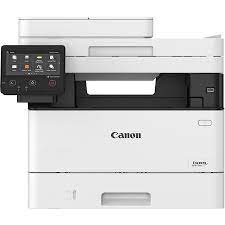
Canon i-SENSYS MF453dw Printer

Canon i-SENSYS MF453dw Driver for Linux

Driver NameVersionRelease dateFile SizeOperating systemsDownload Link
UFR II/UFRII LT Printer DriverV6.0011 September 202463 MBLinux (32-bit)
Linux (64-bit)
Linux ARM
Linux MIPS
Download
Canon imageRUNNER 10204if Printer Description for Linux

UFR II/UFRII LT Printer Driver: Canon UFR II/UFRII LT Printer Driver for Linux is a Linux operating system printer driver that supports Canon devices. It uses the CUPS (Common Unix Printing System) printing system for Linux operating systems. Installing this driver enables you to print with built-in device functions from the GUI (Graphical User Interface) settings screen and command line.

Canon i-SENSYS MF453dw Printer Driver Download for Windows

Compatibility Systems: Windows 11, Windows 10 (32bit), 10 (64bit), Windows 8.1 (32bit), 8.1 (64bit), Windows 8 (32bit), 8 (64bit), Windows 7 (32bit), 7 (64bit), Vista (32bit), Vista (64bit),XP, WinXP (64bit)

Driver NameVersionRelease dateFile SizeDownload Link

Generic Plus PCL6 Printer Driver
V2.6030 June 202258.5 MBDownload
Canon i-SENSYS MF453dw Driver Description for Windows

Canon i-SENSYS LBP3370DN Driver MAC

Canon i-SENSYS LBP3370DN Driver Download for MAC OS X 15, 14, 13, 12, 11, 10.15, 10.14, 10.13.6

UFR II/UFRII LT Printer Driver & Utilities for Mac

Canon iSENSYS LBP3370DN Driver MAC
Canon i-SENSYS LBP3370DN MF Laser Printer

Canon i-SENSYS LBP3370DN Driver for MAC

Compatibility Systems: macOS 15 (Sequoia), macOS 14 (Sonoma), macOS Ventura 13, Monterey 12, Big Sur 11, Catalina 10.15, Mojave 10.14

Driver NameVersionRelease dateFile SizeDownload Link
UFR II/UFRII LT Printer Driver & UtilitiesV10.19.2417 April 202676.2MBDownload
Canon i-SENSYS LBP3370DN Driver Description for MAC

The following instructions show you how to download the compressed files and decompress them.

  1. Click the link. The download will start automatically.
  2. Files are saved on your computer desktop.
  3. Double-click the file to mount the Disk Image.
  4. Double-click the mounted Disk Image.
  5. Double-click the Installer file in the folder. Installation starts automatically.

Canon i-SENSYS LBP3370DN Driver Download for Windows

Compatibility Systems: Windows 11, Windows 10 (32bit), 10 (64bit), Windows 8.1 (32bit), 8.1 (64bit), Windows 8 (32bit), 8 (64bit), Windows 7 (32bit), 7 (64bit)

Driver NameVersionRelease dateFile SizeDownload Link
Generic PCL6 Printer DriverV3.1124 Nov, 202146.05 MBDownload
Canon LBP3370DN Driver Description for Windows

Canon i-SENSYS MF453dw Driver MAC

Canon i-SENSYS MF453dw Driver for MAC 14, 13, 12, 11, 10.15, 10.14, 10.13

Scanner Driver & Utilities-PS Printer Driver & Utilities-UFR II/UFRII LT Printer Driver & Utilities for MAC

Canon MF453dw Driver MAC
Canon i-SENSYS MF453dw Printer

Canon i-SENSYS MF453dw Driver for MAC

Operating Systems: macOS 14 (Sonoma), macOS Ventura 13, Monterey 12, macOS Big Sur 11, macOS Catalina 10.15, macOS Mojave 10.14, macOS High Sierra 10.13

Driver NameVersionRelease dateFile SizeDownload Link
Scanner Driver & UtilitiesV2.15.1422 Sep, 202387.05 MBDownload
Scanner Driver & UtilitiesV2.15.1121 Nov, 202287.0 MBDownload
Canon i-SENSYS MF453dw Driver Description for MAC

Scanner Driver & Utilities: The MF Scan Utility and MF Toolbox necessary for adding scanners are also installed. To find out which application the printer model you are using supports, refer to the Readme file.

PS Printer Driver & Utilities: The following instructions show you how to download the compressed files and decompress them.

UFR II/UFRII LT Printer Driver & Utilities: The following instructions show you how to download the compressed files and decompress them.

  1. Click the link. The download will start automatically.
  2. Files are saved on your computer desktop.
  3. Double-click the file to mount the Disk Image.
  4. Double-click the mounted Disk Image.
  5. Double-click the Installer file in the folder. Installation starts automatically.