
Download Canon imageCLASS MF3010 Laser Multifunction Printers Driver for Windows 11, 10, 8.1, 7 (64-bit)
imageCLASS MF3010/ MF3010 VP MFDriver (UFR II / ScanGear)
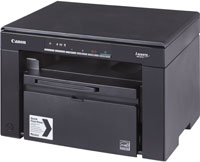
Print and copy speeds up to 19 ppm. One digit LED display for easy operation. Scan documents up to 8.5 x 11 (letter) sizes and auto convert to PDF’s Up to Letter
Canon imageCLASS MF3010 Printer Driver for Windows
Operating systems: Windows 11, Windows 10 (x64), Windows 8.1 (x64), Windows 8 (x64), Windows 7 (x64), Windows Vista (x64), Windows XP (x64)
| Driver Name | Version | Release date | File Size | Download Link |
| imageCLASS MF3010/ MF3010 VP MFDrivers (UFR II / ScanGear) | V3.901 | 11 Nov, 2022 | 66.48 MB | Download |
imageCLASS MF3010/ MF3010 VP MFDrivers (UFR II / ScanGear):
Driver Version : UFR II Printer Driver – V20.95, ScanGear – V11.3
*Precaution When Using a USB Connection
Disconnect the USB cable that connects the device and computer before installing the driver.
Connect the USB cable after installing the driver.
Drivers and applications are compressed.
Download the file.
* When clicking [Run] on the file download screen (file is not saved to disk)
1. If the User Account Control prompt is displayed, click [Yes], and then click [Run] on the subsequent Security Alert screen.
2. The Setup Wizard will start.
3. After the Setup Wizard has started, follow the instructions on the screen to perform installation.
We really appreciate your products. They are excellent and give us what exactly we expect from them. Thanks Canon for your good products.
i am keep on trying to install canon image class MF3010 driver for windows 10 64 bit machine but it is not supporting. please help.
I am trying but it is not working